Features · Check-in and check-out
Equipment check-in and check-out software that knows who has it
Moving an item to a jobsite, a van or a person checks it out. Moving it back to the yard checks it in. A crew member does either by scanning the tag with their phone, and every handoff is recorded with a name and a time.
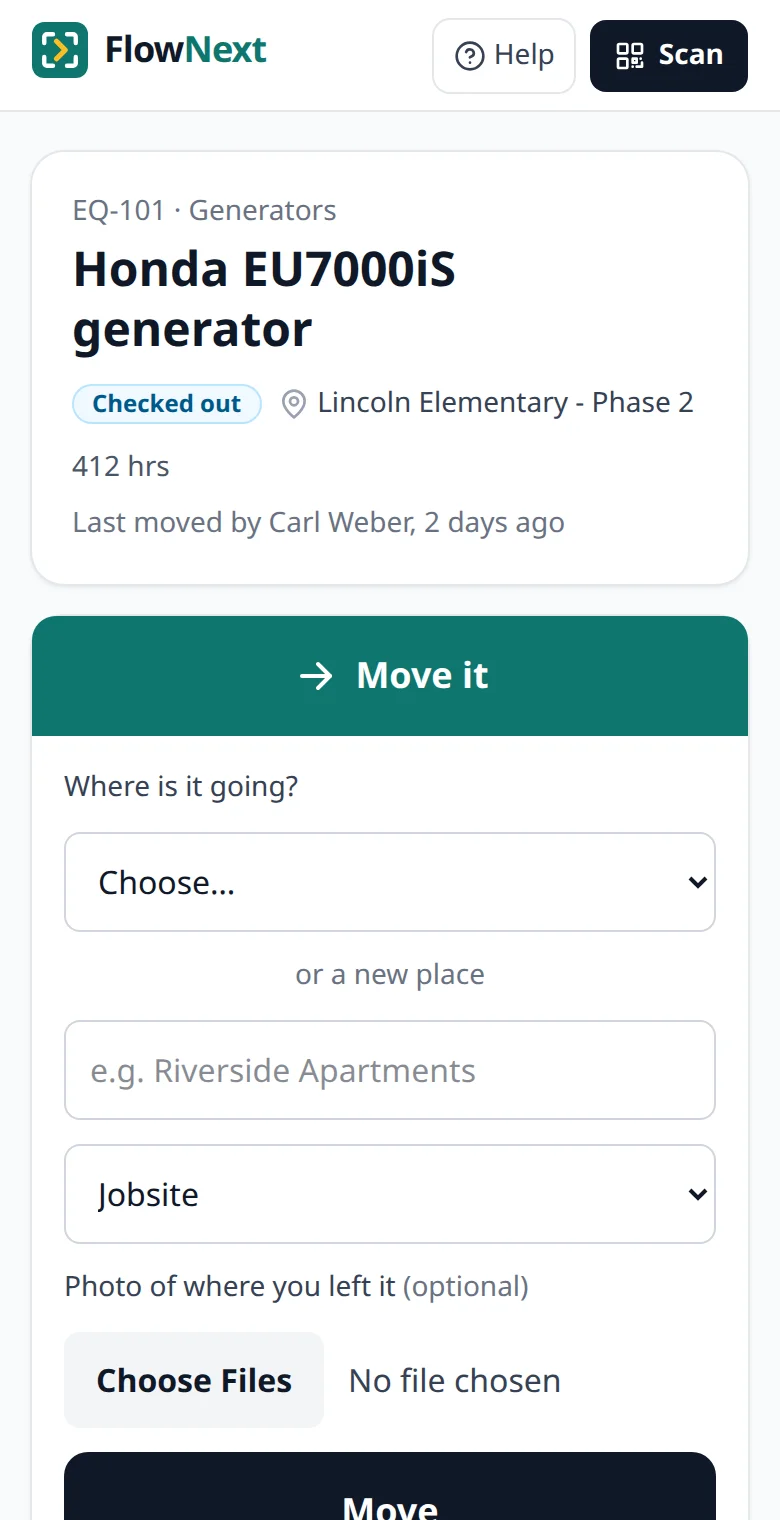
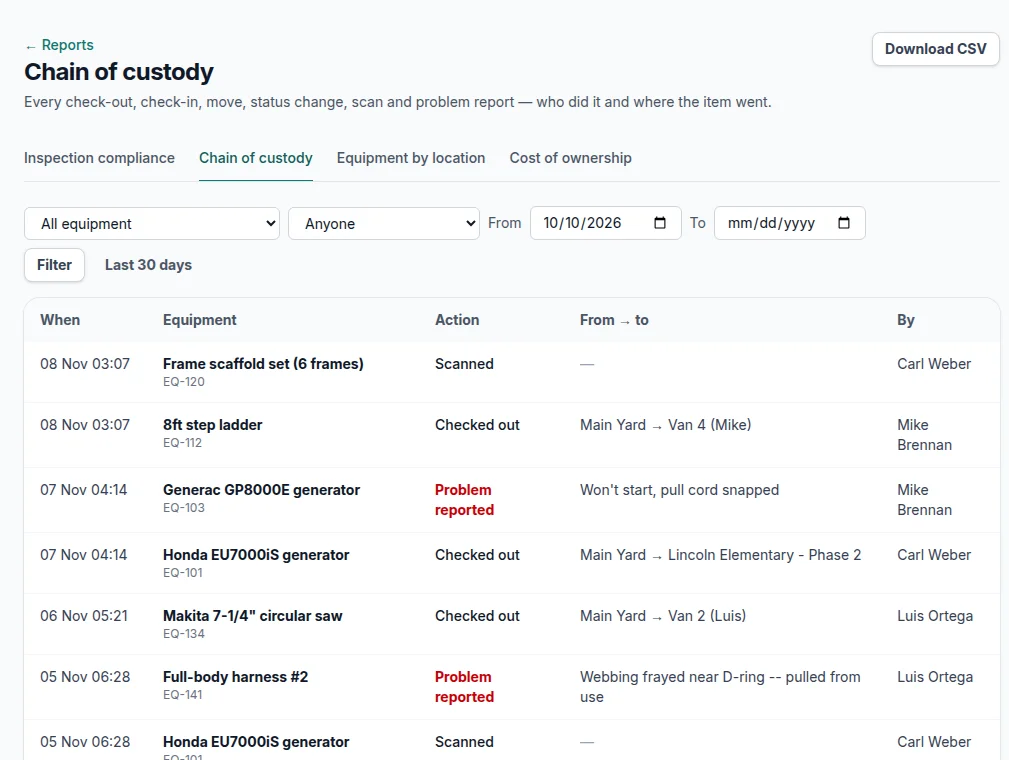
Screens from a demo account with made-up equipment and people.
How a check-out works
-
1
Scan the tag
Any phone camera opens the item in the browser. No app, and field users are free and unlimited, so everyone who handles gear can do it.
-
2
Pick where it's going
A jobsite, a van or truck, or a person — a crew lead or a sub holding it. Type a new jobsite name on the spot if it isn't listed. The item now reads Checked out.
-
3
Bring it back
Moving it to a yard or warehouse checks it in and marks it Available. Items in repair or out of service keep that status when they move, so nobody grabs a broken one.
The office can do the same from the item's page. Either way the move goes through one path, so there's no way to change where something is without it landing in the record.
The questions a sign-out sheet can't answer by Monday
Who has the pipe press?
Filter the equipment list to Checked out to see every item that's away and where it is — a jobsite, a van or someone's name. Scan the tag and the page says who moved it last and how long ago.
What's in Van 3 right now?
Each location lists the equipment there. The equipment by location report puts every jobsite, van and person on one page, with the person in charge and the last time anything there was scanned or moved.
Where has this generator been?
The chain of custody report lists each check-out, check-in, status change, scan and problem report as From → To with who did it. Filter by item, person and dates, then download exactly those rows as a CSV.
What changed across the company on Tuesday?
The activity log shows every change to every item, newest first. Filter by kind, person, location or date; the CSV export is whatever the filters show.
A record that holds up when something goes missing
- Entries can't be edited or deleted afterwards, by anyone, owners included.
- Names are kept as they were: renaming "Van 4" or removing a crew member who left doesn't rewrite where the drill went or who took it.
- A crew member can add a photo of where they left it. The phone's location at that moment is saved with the move too, unless an owner turns it off.
- Retired equipment is archived, not deleted, so its history stays.
What it doesn't do
There are no reservations and no due-back dates, so nothing is flagged overdue. FlowNext answers who has it, where, and since when. If you book gear out days in advance, like an AV or rental counter, a reservation tool is the better fit.
Location is read only when someone moves an item, logs hours or reports a problem. It isn't live GPS tracking.
It checks equipment in and out, not people. For signing crews in at the gate and checking that their company's insurance and licenses are current, our sister product TrackMyVendor has jobsite check-in.
Still on a clipboard?
A paper sheet works while one person runs the yard and everyone writes things down. Our guide to choosing an equipment check-out system covers what each sign-out has to record, where the sheet breaks, and has a free printable one. Once the sheet stops working, see how equipment tracking software handles the rest: tags, inspections and repair costs.
Questions
What counts as checked out?+
Anything moved to a jobsite, a vehicle or a person. Moving it back to a yard or warehouse checks it in and marks it available again.
Can I set a due-back date?+
No. FlowNext records who has each item, where and since when, but it doesn't take reservations or flag items as overdue.
Can the crew check equipment out without the office?+
Yes. Any crew member signed in on their phone can scan a tag and move the item. Field users are free and unlimited on every plan.
Can I export the check-out history?+
Yes. The chain of custody report and the activity log both download as a CSV of exactly the rows you filtered.
Guides on equipment tracking and check-out
More of what's in FlowNext
- QR & barcode tags Print your own labels or use the barcodes already on your gear.
- No-app field updates Crews move gear, log hours and report problems from a phone camera.
- Inspections & AI reading Due dates from your certificates, and a morning email before they lapse.
- Reports Compliance, chain of custody, equipment by location, cost of ownership.
- Maintenance & costs Service history per machine and when to replace instead of repair.
- Import & switching Bring your spreadsheet, or another app's export as it is.
Try it on your own equipment
14 days free on the Pro plan, no card. Import your list, print a sheet of tags and have the crew scan one today.