What a check-out system is for
Not to stop people taking equipment. Crews need the generator; the point is that when it leaves the yard, someone's name goes with it. A working check-out system gives you three things:
A name for every item out
When the laser can't be found, you call one person instead of asking the whole company.
A place for every item out
A machine signed out to a person can still be sitting on a jobsite you've finished. The place matters as much as the name.
Its condition, both ways
If damage is written down when it comes back, it gets fixed before the next job instead of found on site.
The eight things every sign-out records
Whether it's a sheet, a spreadsheet or an app, each check-out needs the same fields. Leave one out and the record stops answering the question it's for.
- 1 Date out. Without it you can't tell a tool borrowed yesterday from one missing since spring.
- 2 The item and its number. “Generator” isn't enough if you own three. Use the number written on the machine.
- 3 Who took it. A person, not a crew. “Framing crew” is nobody when something goes missing.
- 4 Where it's going. The jobsite or the vehicle, by the name on the schedule.
- 5 Condition out. “OK” is fine. What you need is the exception: “cracked guard,” “one blade left.”
- 6 Date back. The blank cell is the useful one: every row with no return date is something that's out right now.
- 7 Who returned it. Often not the person who took it, which is exactly when things get lost.
- 8 Condition back. Anything damaged gets tagged out of service before it goes back on the shelf.
Here's how those eight look on a filled-in sheet, numbered the same:
Equipment sign-out sheet
Location: Main yard gate
| 1 Date out | 2 Item and number | 3 Taken by | 4 Going to (job, van) | 5 Condition out | 6 Date back | 7 Returned by | 8 Condition back / notes |
|---|---|---|---|---|---|---|---|
| 10/14 | EQ-101 Generator 7500W | D. Price | Elm St job | OK | 10/16 | D. Price | OK |
| 10/15 | EQ-135 Laser level | M. Brennan | Van 2 | OK | |||
| 10/15 | EQ-130 Rotary hammer | C. Weber | Riverside | OK | 10/17 | L. Ortega | Chuck sticks, tagged out |
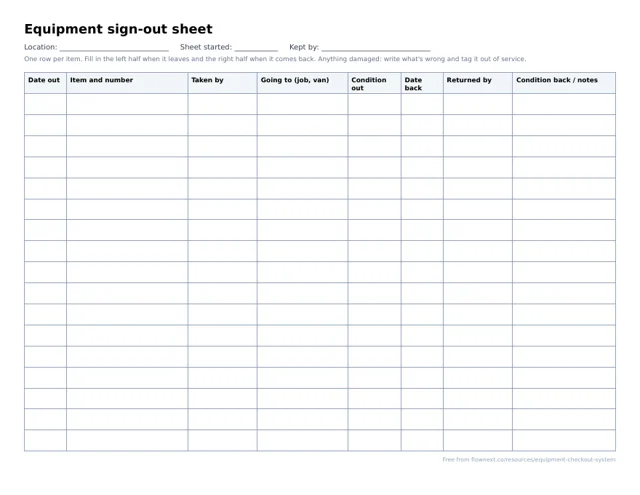
Free printable equipment sign-out sheet
One landscape page, seventeen rows, with exactly the eight columns above: the left half for when it leaves, the right half for when it comes back.
Free PDF
Equipment sign-out sheet
A printable PDF with a row for each item out and back: who, where, when and its condition.
Download the equipment sign-out sheetPrint a stack, put them on a clipboard by the yard gate or the trailer door, and tie a pen to it. The location line at the top is for when you keep one sheet per vehicle or jobsite.
Running it on paper
A sheet is a loop, and it only works if every step of the loop happens:
-
1
Sign it out
At the gate or the trailer: the left half of the row, before it's loaded.
-
2
On the job
It stays with the name on the row. Lending it on means a new row.
-
3
Sign it back
The right half, while unloading: who, when, and what's wrong with it.
-
4
Shelf or repair
OK goes back on the shelf. Damaged gets tagged out of service.
- One sheet per place. A sheet at the yard gate for what leaves the yard, and one in each vehicle that carries shared equipment.
- Someone owns it. Paper works when one person looks at the open rows every Friday and calls the names on them. Without that, it's a record of what happened, not a system.
- Copy it somewhere weekly. A full sheet in a drawer can't be searched. Typing the open rows into a spreadsheet each week keeps the history findable.
Write the rules down: who can take what, what happens with damage, and who chases overdue items. The tool check-out policy template is a starting point you can adapt for equipment.
Where a sign-out sheet breaks
Paper is honest about one place and one moment. It struggles as soon as equipment moves without coming back to the clipboard:
- Job-to-job moves. The compressor goes from one site straight to the next. The sheet at the yard still says the first site, and no one is near it to update it.
- Handoffs in the field. One foreman lends the laser to another. Neither of them has the sheet.
- Several yards or vans. Five sheets in five places means nobody can answer “where is it?” without five phone calls.
- Looking back. “Who had the lift on the 14th?” means leafing through months of paper, if it was kept.
- Inspections and hours. A sheet doesn't know the harness is overdue for inspection or that the generator just passed its service hours.
If two or more of those are your week, the sheet is costing more time than it saves. Here's how the three usual options compare:
Sign-out sheet
One yard, one crew, gear that comes back to the same gate.
- Free, and everyone understands it
- Works without a signal
- Can't follow job-to-job moves
- Months of history in a drawer
Spreadsheet
An office that types the sheets up weekly.
- Searchable history
- Easy to share with the office
- Only as current as the last typing
- The field can't update it
Check-out software
Equipment that moves between jobs, vans and people.
- Updated where the equipment is
- History kept automatically
- A monthly cost
- The crew has to use it
What check-out software changes
Software doesn't change the eight fields. It changes where they're filled in: at the equipment, by the person holding it, instead of at the clipboard. That fixes job-to-job moves and field handoffs, because the record travels with the machine.
Check before you buy check-out software
- Who can record a check-out. If every crew member needs a paid seat, you'll end up with the foreman doing it for everyone, later.
- Whether it needs an app. An app means installs, logins and updates on every phone, including the sub's.
- Whether the place is part of the check-out. “Checked out to Dave” is half the answer; “on the Elm Street job with Dave” is the whole one.
- Whether returns are one step. If checking in is harder than checking out, it won't happen.
- Whether the history is permanent. A custody record that can be edited after the fact won't settle a dispute.