Features · QR & barcode tags
QR code asset tags you print yourself — or the barcodes already on your equipment
Every item gets its own QR code. Print a sheet on ordinary Avery labels, stick them on, and any phone camera opens that item. Already have rental stickers or asset-tag barcodes? Link those instead.
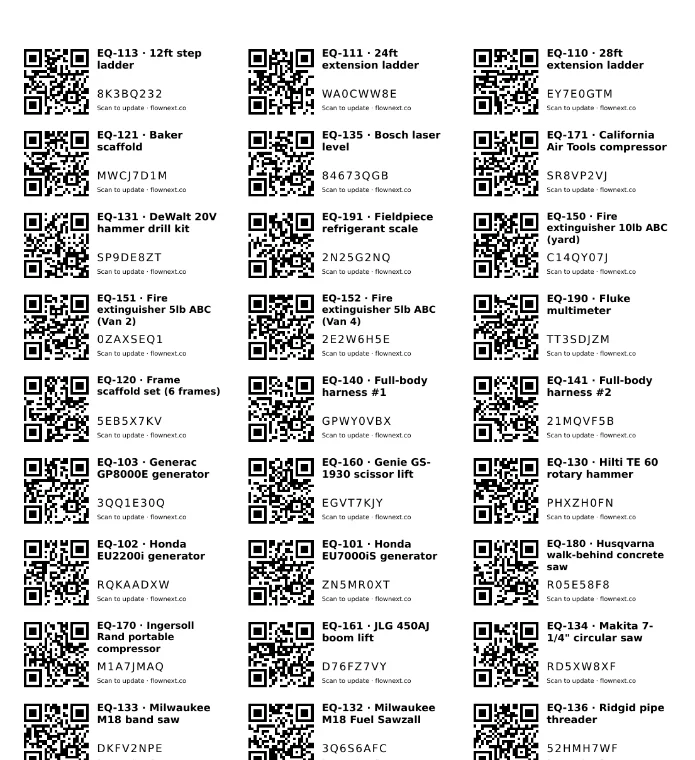
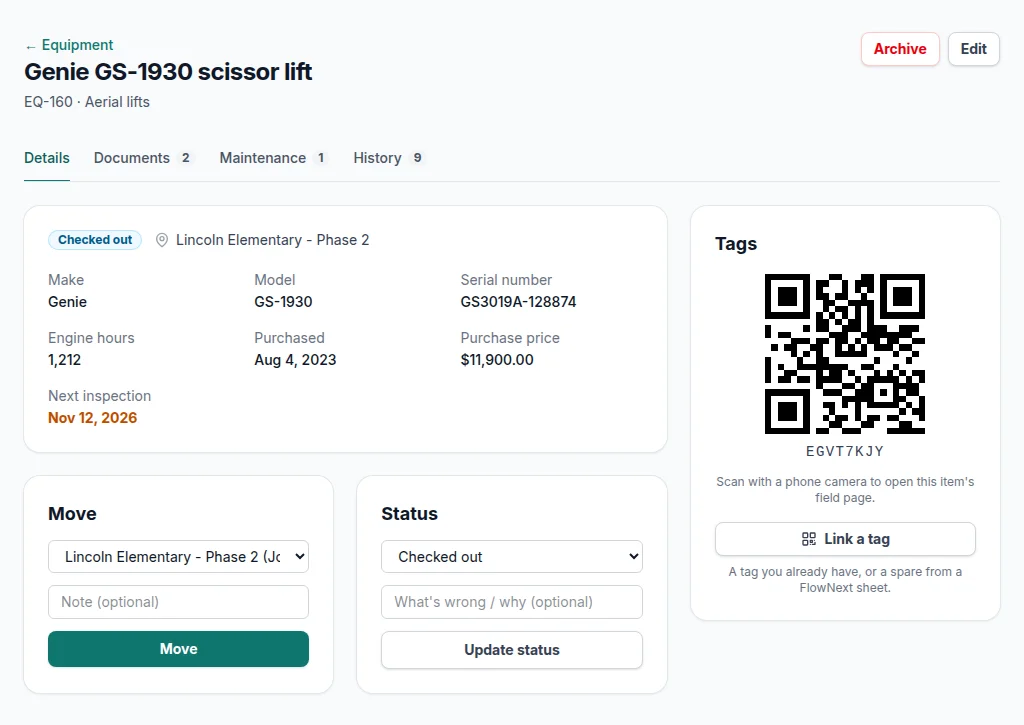
Screens from a demo account with made-up equipment and people.
Print your own sheets
Filter the equipment list (or don't), choose a starting label and download a PDF laid out for Avery 5160 / 8160 address labels — 30 to a sheet, each with the item's name and code. A part-used sheet is fine: start at label 12.
No tags to buy from us
There is no proprietary tag. Paper labels are fine indoors; for anything that lives outside, print the same layout on weatherproof polyester labels, or use your own engraved or metal tags.
Free before you sign up
The free QR label generator prints up to 150 tags, labelled with names you type in, without an account. Stick them on now; when you sign up, claim the sheet and link each tag to its item.
Use the barcodes you already have
Rental companies, manufacturers and earlier asset-tracking systems leave codes on your gear. Open Link a tag on an item, scan the code with the phone or laptop camera, and from then on scanning it opens that item.
FlowNext's scanner reads:
- QR codes (anyone's)
- Data Matrix
- Code 128
- Code 39 and Code 93
- EAN-13 and EAN-8
- UPC-A and UPC-E
- ITF
- Codabar
One thing to know about other people's codes
A phone's built-in camera app opens a QR code's own link — so a FlowNext QR opens FlowNext, but a rental company's QR opens the rental company. Third-party codes and barcodes are read through FlowNext's Scan a tag page instead, which is a web page in the phone's browser (still no app to install).
If an item carries both, either one works.
What happens when someone scans
-
Your crew
See the item, where it is and its status, and can move it, log hours or report a problem. See field updates.
-
The office
Gets the same page plus a link to the full record. Scan a tag in the office sidebar finds an item from a laptop webcam.
-
Anyone else
Sees only which company the item belongs to and a sign-in button. Nothing about the item is shown to a stranger who finds it.
Every scan by your team is written to the item's history with who and when. Codes are eight characters from an alphabet without look-alike letters, so one can be typed in if a label is scratched.
Questions
Do I have to buy tags from FlowNext?+
No. Print QR tags on Avery 5160 / 8160 address labels, or the same layout on weatherproof polyester labels for gear that lives outside. Engraved or metal tags you buy elsewhere work too.
Can I use the barcodes already on my equipment?+
Yes. Link a rental sticker, manufacturer barcode or old asset tag to the item once, then find the item by scanning it with FlowNext's in-app scanner. A phone's own camera app opens only FlowNext QR codes.
What does a stranger see if they scan a tag?+
Only which company the item belongs to and a sign-in button. Nothing about the item is shown.
Guides on tags and labels
More of what's in FlowNext
- No-app field updates Crews move gear, log hours and report problems from a phone camera.
- Inspections & AI reading Due dates from your certificates, and a morning email before they lapse.
- Reports Compliance, chain of custody, equipment by location, cost of ownership.
- Maintenance & costs Service history per machine and when to replace instead of repair.
- Import & switching Bring your spreadsheet, or another app's export as it is.
Try it on your own equipment
14 days free on the Pro plan, no card. Import your list, print a sheet of tags and have the crew scan one today.